Auto-digitizing photographs
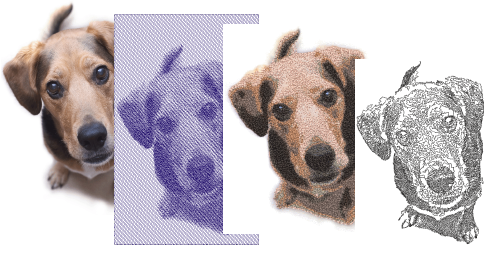
EmbroideryStudio provides dedicated techniques for auto-digitizing photographs. Both colored and grayscale photos can be used as input.
| Feature | Overview | |
|---|---|---|
 | Photo Flash | The Photo Flash feature creates embroidery designs from photographs and other grayscale bitmap images. The effect resembles the output of a line printer. |
 | Reef PhotoStitch | The Reef PhotoStitch feature also creates embroidery designs from photographs and other bitmap images. The features creates open stitching reminiscent of a coral reef. |
 | Color PhotoStitch | The Color PhotoStitch feature creates embroidery from photographs and other images. It produces variegated stitching using multiple thread colors. |
Results depend greatly on the resolution, color depth, and quality of source images. For best results, use crisp images with well-defined subjects and strong contrasts.
In addition a degree of preparation is needed. This may involve preparation using third-party graphics applications such CorelDRAW Graphics. Tools are also available within Wilcom Workspace. See also Prepare photos for auto-digitizing.