Corner handling methods
The following approaches can apply to both appliqué and standard satin (Column C) columns.
| Method | Sample | Outline | Description |
|---|---|---|---|
| No corner |  |  | Stitches curve around corners – standard Column C corner handling. |
| Mitre corner | 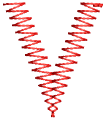 |  | Corners are formed by two segments that join in a sharp point. |
| Cap corner | 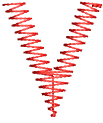 |  | Corner is capped by an extra segment – cap stitching remains parallel to the column. |
| Lap corner | 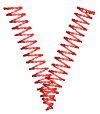 |  | Corner broken into two segments. |
Corner rounding
A Round Sharp Corners option is available for Column C objects which can also be applied to sharp corners. The option is only available in conjunction with the Smart Corners effect. It is typically used with the Cap Corner option.
| Method | Sample | Outline | Description |
|---|---|---|---|
| Rounded corner | 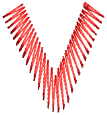 |  | Corner is sewn in one segment, with turning stitching, forming a round corner on the outer boundary. |
| Rounded cap corner | 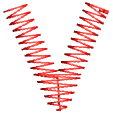 |  | The corner is sewn in three segments forming a round corner on the outside boundary. |