Display grids, rulers & guides
 | Click View > Show Grid to show or hide the grid. Right-click for settings. |
|---|---|
 | Click View > Show Rulers and Guides to show or hide rulers and guides. Right-click for settings. |
 | Drag the Ruler Zero Point to reset a new ruler zero point. |
EmbroideryStudio provides a set of grid lines to help accurately align or size embroidery objects.
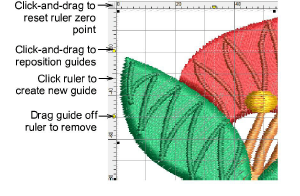
Use grid lines to help accurately align or size embroidery objects. Default grid spacing is 10mm x 10mm. Invoke rulers to accurately position and scale objects. The unit of measurement – mm or inches – defaults to the regional settings in the MS Windows® Control Panel.