Embroidery machine formats
Different embroidery machines speak different languages. They have their own control commands for the various machine functions. When you create a design, you need to select a format corresponding to the embroidery machine you intend to use. EmbroideryStudio uses the format to translate digitized designs into a specific machine-readable form. You don’t, however, need to change a design’s ‘native machine format’ in order to output to a different machine. If a selected machine format does not support a particular function in the design, it is simply ignored on output.
To select a machine format...
- Select Design > Select Machine Format.
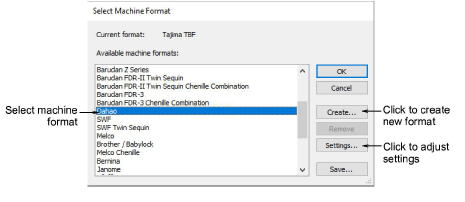
- Select the required machine format from the list.
Note
You can change the machine format itself if machine values do not correspond precisely to your particular machine. Or you can create a new format based on a selected one.