Change thread colors
ES Cross Stitch lets you reassign design colors using the design’s thread chart. You can choose colors from pre-defined thread charts or mix your own.
To change thread colors...
- Select Edit > Colorways. The Thread Colors dialog opens.
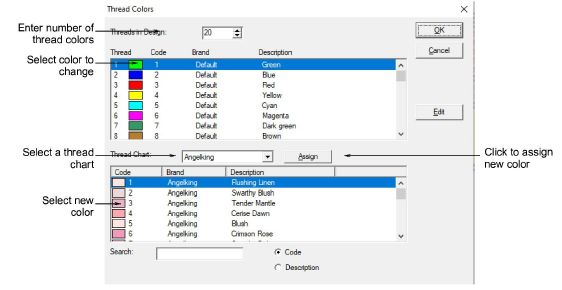
- Enter the total number of colors you want to use in the Threads in Design field.
TIP
Color palettes are limited to 128 colors. 36 will fit comfortably at 800 x 600 resolution.
Select a thread chart from the Thread Chart list.
In the upper panel, select the thread color to change.
TIP
To mix your own color, use the Edit button.
- In the lower panel, select the new thread color and click Assign.
TIP
To find a required color, search using the Search field.