Apply automatic pull compensation
 | Use Stitch Effects > Pull Compensation to automatically compensate for fabric stretch. Right-click for settings. |
|---|
Apply automatic pull compensation to objects in your design and adjust as part of your quality checks prior to stitchout.
To apply automatic pull compensation...
- Toggle automatic pull compensation on/off via the Pull Compensation button.
- Without objects selected, right-click the Pull Compensation icon to change current settings.
- With objects selected, right-click the Pull Compensation icon to change settings for those objects.
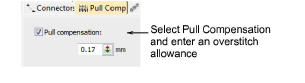
- Enter an overstitch allowance (in millimeters).
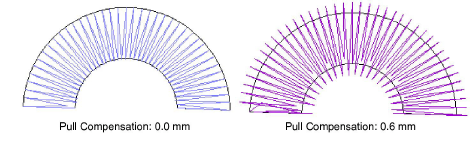
Appropriate pull compensation settings vary with the type of fabric – stretchy, pile, etc – hooping method – tight or loosely hooped – and size of embroidery object – wide or narrow columns. Use the following table as a guideline.
| Fabric | Pull compensation (mm) |
|---|---|
| drills, cotton | 0.20 |
| T-shirt | 0.35 |
| fleece, jumper | 0.40 |
| lettering | 0.2 - 0.3 |