Apply Smart Corners
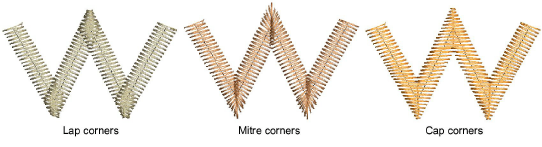
 | Use Stitch Effects > Mitre Corners to create sharp lines at intersections of two columns. Right-click to adjust settings. |
|---|---|
 | Use Stitch Effects > Cap Corners with very sharp corners to generate fewer stitches. Right-click to adjust settings. |
 | Use Stitch Effects > Lap Corners for ‘Tidori’ style stitching. Right-click to adjust settings. |
Use the Smart Corners feature to reduce the number of stitches and risk of bunched, distorted embroidery in sharp corners. Mitre Corners creates a sharp line at the intersection of two columns. Use it primarily for corner angles of 20° to 45°. Cap Corners is suitable for very sharp corners as it generates fewer stitches. Lap Corners is suitable for ‘Tidori’ style stitching. It can be applied to Column C and appliqué objects.
To apply Smart Corners...
- Click a Smart Corners icon with or without objects selected. With no objects selected, smart corners are automatically generated for all new objects. Corners are based on current properties.
- Click again to turn off the effect.
Note
You can also combine Smart Corners in Column C objects with sharp corner rounding.