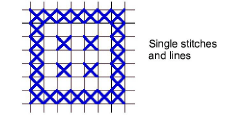
Digitize single stitches or lines
 | Use Cross Stitch > Pencil to draw a single stitch or line of stitches. |
|---|---|
 | Select Stitch > Single Line for a single line. |
 | Select Stitch > Full Cross for lines of crosses. |
As an alternative to Cross Stitch Run, you can digitize a single stitch or line of stitches with the Pencil tool. Depending on the stitch type you select, you can also set the stitch direction.
To digitize a single stitch or line...
Click the Single Line or Full Cross icon. If you are using Full Cross, the currently selected cross stitch type applies.
Select a color from the color palette.
Click the Pencil icon.
Click a square to make a single stitch, or click and drag the pencil to make a line. Press Ctrl and drag to draw straight vertical lines.
TIP
You can also use the Pencil tool to create combinations of partial crosses comprised of multiple colors.