Blocks options
The Blocks tab lets you further filter production information available on the Design Information docker for inclusion in the printout.
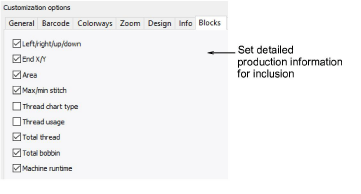
Select design statistics to include on the worksheet:
| Option | Function |
|---|---|
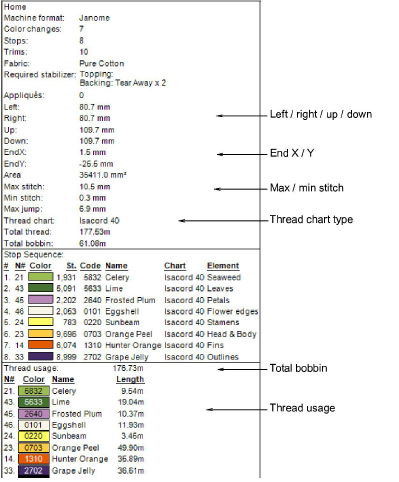
| Left / right / up / down | Depending on where the design start/end point has been set, these figures indicate the distance from that point. |
| End X / Y | The coordinates of the last stitch. |
| Area | Total area covered by design – used for estimating hoop sizes, fabric requirements, 3D foam, or whether design will fit target location. |
| Max / min stitch | The maximum and minimum stitch lengths, and maximum jump stitch length in the design. |
| Thread chart type | The name of the thread chart used in the design. All required brands for used threads are displayed in a comma-separated list. |
| Thread usage | Meterage of thread required per color. |
| Total thread | Total meterage of top thread required to stitch out the design. |
| Total bobbin | Total meterage of bottom thread (bobbin) required to stitch out the design. |
| Machine runtime | This checkbox is only available if the feature is available in the software. If there are no machines set up, checking ‘Machine runtime’ has no effect. |
Here is a sample worksheet with all options selected: